
Low-code platforms have become an integral part of modern software development. They offer the advantage of faster development with less coding, reducing both costs and errors. But how do you properly test a low-code application? The Sofius labels support various clients in their low-code journeys. In this blog, we share 7 do’s for effectively testing low-code platforms
Building an application visually
Instead of writing traditional code, low-code platforms allow you to configure applications through a graphical interface. The idea: build your application by visually connecting components. For testers, this means that testing mainly focuses on the interaction between different building blocks and the functional testing of the software.
1. Involve the entire team during development
Low-code development is visual, making it easier to share with stakeholders. Involve the entire team, including key users and business stakeholders. This approach, also known as ‘visual thinking’, helps everyone understand the development process and improves application quality.
2. Gain early insight into the development process
Low-code platforms give testers the opportunity to gain insight into the application early in the process (‘shared understanding’). Sit next to the developer and let them guide you through the system visually. This speeds up testing of complex functionalities and prevents surprises later on.
3. Collaborate closely with developers
Communication around low-code applications is accessible and straightforward. Actively collaborate with developers—you share the same goal: improving software quality. Together, you can identify issues and improvements more quickly.
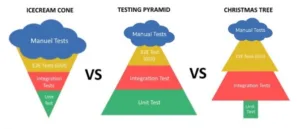
4. Apply the ‘Christmas tree’ model for test automation
Low-code shifts the focus from unit tests to end-user testing. The ‘Christmas tree’ model combines manual and automated testing across different layers, making your test strategy better suited for a low-code environment. This model offers a more flexible approach than traditional ‘ice cream cone’ or ‘testing pyramid’ models.
5. Use standard management and monitoring tools
Every low-code platform includes built-in tools that testers can leverage:
- Mendix Application Quality Monitor – insight into component quality
- OutSystems Architecture Dashboard – visibility into module dependencies
- OutSystems LifeTime – overview of the full application lifecycle
By using these tools, you maintain control over quality and progress.
6. Generate fast feedback with test automation
Automate wherever possible to get quick results and feedback. Use tools that fit your low-code environment, such as Leapwork, which allows you to build low-code test scripts via drag-and-drop. This helps you detect bugs faster and improve software quality.
7. Apply exploratory testing
Learn from your tests and experiment with the platform. In low-code, it’s often easy to follow the visual logic and uncover unexpected bugs. For example, organize a ‘bug hunt’ with your team to identify unknown issues. Expand your knowledge by taking a low-code course and discover how to test more effectively.
Want to learn more about testing low-code platforms? Or need help with a testing challenge in your organization? Get in touch with us!